WordPress Page Excerpt Widget

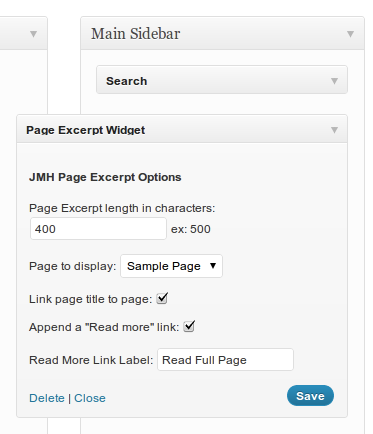
I have created a little WordPress plugin in the shape of a widget, which allows the user to display an excerpt of a page in a sidebar area of their choice. It in fact now is online in the WordPress Plugin repository: Page Excerpt Widget. Feel free to test and rate it!

I wrote this to replace a little theme hack I did for a client, where the front page was supposed to have an excerpt of a page on the front page, of course linking to the full page. Instead of keeping it that way and hard coding the page-id, I wanted something where the end user could change which page was supposed to be linked.

Right now you can:

  • Define the amount of characters to use as an excerpt
  • Select the page from all existing pages
  • Link the title of the page, to the page
  • Append a link to the page
  • Decide a custom label for the read more link
  • the possibility for multiple instances of the widget

future plans:

  • some internationalisation

Link to the github repository of the plugin, since I prefer git over svn: https://github.com/JonathanMH/page-excerpt-widget

wordpress_page_excerpt_widget_screenshot-1wordpress_page_excerpt_widget_screenshot-2

14 Responses to “WordPress Page Excerpt Widget”

  1. Temeraire says:

    Hi,
    Just tested this. Its a nice and straightforward widget, much more effective than other, more sophisticated plugins…
    Is this widget going to work with multi-language plugins such as WPML? If not, any ideas about plans to add this functionality? Your widget is amazingly simple, nice work. :-)

    • jonathan says:

      Yes, multiple instances and multi language support are on the list for the future. I’ll take a look at how to support wpml

  2. Latvian says:

    I like this concept very much!

  3. [...] Drupal is an amazing CMS, but it was getting in the way of how I like doing things and what I wanted to work with in the near future, since I’ve also started developing WordPress Plugins. [...]

  4. Angelilque says:

    This is quite fab; thanks so much! Any idea of how easy it would be to add the page’s featured image to the widget’s output?

  5. Angelilque says:

    Actually, I just sorted out how to add this to the existing plugin’s code & admin. If this is something you’d like me to share, let me know :)

    Apologies for the double posts and thanks for getting me set on the right path.

    • Jonathan says:

      Hey, I’d love to see that! So happy I could make your life easier with this. Just send me a pull request on github or links to pastebin, I’ll see if I make it permanent features! :)

  6. [...] instances of widgets are very easy since WordPress 2.8 and my little Page Excerpt Widget now is re-written to support just [...]

  7. Sam says:

    I have been using this plugin and it works perfectly, but I wanted just a bit more access to style the “read more” link. To get the extra styling I was looking for I had to go into the “jmh_pew.php” file and find the “a” tag that controlled the ['display_read_more'] instance. I know that it works for my purposes for now but if you come out with any new updates this will brake my update, so I am asking for an additional input from the admin panel below the “read more” label that can input a custom class.

    I think that this will allow for just a bit more of a custom look and it will also allow for multiple styling with the same widget.

    thanks you for the widget and for reading my comment.

  8. Lucy Ryder says:

    Hello, just found your plugin and it’s great! Only thing is, i need to use it on 3 widgetized areas in my sidebar, but i can only use it once – the second one i use it in breaks and does not display / messes the page layout up.
    Any ideas how i can use it 3 times in one sidebar?

    Many thanks
    Lucy

  9. Ethan says:

    I’m currently using this widget on a project. I discovered a bug with the markup. If you happen to cut a formatted portion of the text (i.e. an tag) it will only print the first portion of that tag. As a result, the system either wants to complete the tag or recognizes it as a wrapping element around everything else below that closed tag. If you could include an option to strip html formatting from the page that would be great.

Leave a Reply